macOS 12+ Universal · Linux x86_64 · 35 ms Local Metal
Hold Ctrl. Speak. Done.
Instant push-to-talk voice dictation in Go + native OS toolkits. Runs 100% on-device with Apple Silicon Metal, strips “um/uh” stutters locally, and pastes without wiping your clipboard.
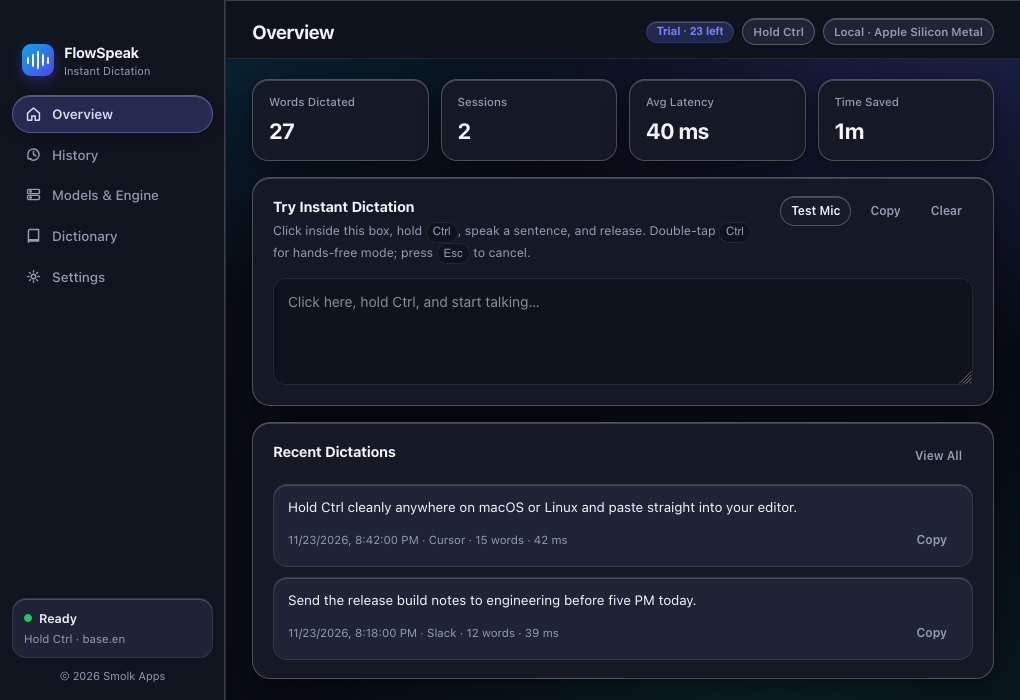
Zero friction from thought to text
Built as a native menu-bar utility in Go + AppKit, with zero Electron bloat, zero workspace popups, and zero broken Ctrl+C shortcuts.
Hold Ctrl anywhere
Works in Slack, Cursor, Terminal, Chrome, Mail, or any focused text field. Regular chords like Ctrl+C, Ctrl+A, and Ctrl+Click cancel capture untouched.
Speak naturally
A subtle non-activating pill confirms live mic input without stealing window focus. Double-tap Ctrl to lock hands-free for longer notes, or press Esc to abort.
Clean text in 35 ms
Hesitations like “um” and “uh”, duplicate stutters, and Whisper silence tags are stripped locally in under 1 ms. Your previous clipboard is automatically restored.
Built for people who type all day
Engineered to feel instantaneous while keeping your voice strictly on your own hardware.
Private on-device Whisper
Static whisper.cpp v1.9.5 in-process with Apple Silicon Metal GPU and Intel AVX2/Accelerate, so no audio leaves your machine unless you opt into your own API key.
Smart chord & click guard
Hitting Ctrl+C, Ctrl+R, or right-clicking with Ctrl+Click aborts capture immediately before opening the mic or pasting anything.
Personal Dictionary & Snippets
Bias Whisper decoding and rewrite spoken names, hosts, and jargon automatically (e.g. mapping cube control → kubectl), plus instant voice snippets.
Bring your own cloud or Ollama
Want Groq cloud speed or local Ollama grammar polish? Connect Groq, OpenAI, or any OpenAI-compatible LAN server using your own OS Keychain secret.
Clipboard-preserving paste
FlowSpeak snapshots your clipboard contents before pasting, marks temporary pasteboard data as transient for clipboard managers, and restores your original clipboard cleanly.
100% offline licensing
After one-time key activation, FlowSpeak verifies a local Ed25519 certificate completely offline, with zero constant license heartbeats or telemetry.
Why pay $180/year for dictation?
Compare FlowSpeak against subscription tools before locking in a recurring bill. Read deep comparisons: FlowSpeak vs Wispr Flow · FlowSpeak vs Superwhisper.
| Feature | FlowSpeak Pro | Wispr Flow | Superwhisper |
|---|---|---|---|
| Price | $19 once (Black Friday; $29 reg.) | $15 / month ($180 / yr) | $8.49 / mo or $249 lifetime |
| Default Processing | 100% Local Metal / AVX2 (~35 ms) | Cloud servers required | Local or Cloud |
| Hold-Ctrl + Chord Guard | Yes (Ctrl+C & Ctrl+Click safe) | Custom Fn/hotkey | Custom hotkey |
| Clipboard Preservation | Snapshot + restore + transient tags | Replaces or restores | Clipboard restore option |
| Installer Size | ~11 MB native Go + AppKit DMG | ~300+ MB Electron app | ~120+ MB macOS app |
| macOS 12 Monterey + Linux | macOS 12+ Universal & Linux x86_64 | macOS 13+ / Win (no Linux) | macOS 13+ / iOS (no Linux) |
Lifetime License · No Subscription
Try 25 dictations free. Own it forever for $19.
One-time payment via Stripe Checkout (no code needed, auto-applied Nov 24–Dec 1, 2026). Instant license key on screen and by email. Unlocks up to 3 personal computers with a 30-day money-back guarantee.
- 25 free full dictations before buying
- Universal macOS 12+ (Apple Silicon + Intel)
- Linux x86_64 included (Windows coming free)
- Up to 3 computers · Offline Ed25519 key
- All v1.x updates & 30-day refund guarantee
Frequently asked questions
Everything buyers ask before downloading or grabbing a license.
Why isn’t FlowSpeak on the Mac App Store?
The Mac App Store enforces App Sandbox (Guideline 2.4.5), which blocks global CGEventTap Ctrl-hold monitoring and synthetic cross-app Cmd+V pasting. Like Wispr Flow, BetterTouchTool, and Alfred, FlowSpeak distributes directly so Hold-Ctrl dictation works everywhere.
What happens on first launch on macOS?
Apple notarization is finalizing on our developer agreement renewal. Until the notarized DMG lands, macOS Gatekeeper may ask you to confirm opening a newly downloaded app: right-click FlowSpeak.app in Applications → click Open → confirm once, then grant Microphone and Accessibility permissions.
Does FlowSpeak require internet after activation?
No. Once you activate your license key online once, FlowSpeak saves an Ed25519-signed certificate locally and runs local Whisper transcription 100% offline forever.
Will Hold Ctrl break Ctrl+C, Ctrl+R, or Ctrl+Click?
No. FlowSpeak uses a 150 ms hold guard plus instant chord and mouse cancellation: pressing any other key or clicking the mouse aborts dictation immediately before opening the mic.
What if I switch Macs or want a refund?
Each key covers 3 personal machines, and you can click Deactivate This Machine in Settings anytime to free a slot. Need a refund within 30 days? Email support@smolkapps.com and we refund in full.